

Spotify Xirp can be piloted safely only if you treat it as several connected trust boundaries—not as one security control. Xirp keeps project registration and much of its state on the Mac, but the selected native coding agent still communicates and acts under its own provider, credentials, permissions, and sandbox. Connecting Spotify Portal introduces identity, Workspace, MCP, and optional transcript-sharing flows. Spotify’s public preview terms also describe an early-access evaluation product with fewer assurances than a mature production service.
The most important documented warning is easy to miss: uploading a session to Portal is manual, but the transcript can contain the full conversation, tool calls, file changes, reasoning, file paths, and code excerpts, and Xirp does not automatically redact it. A Git worktree reduces checkout collisions; it is not a process sandbox or a data-loss-prevention system.
This guide evaluates the public documentation and terms captured on 11 August 2026. It is not a penetration test, certification, legal opinion, or substitute for your security, privacy, procurement, and employment-policy reviews. Start with the complete Xirp product explainer if you first need the product boundary, or the Portal and MCP architecture map for the context flow.
Executive risk summary
| Area | Documented position | Pilot implication |
|---|---|---|
| Local projects | Registering a local folder does not itself upload its files to Portal. | Still map what the native agent sends to its provider and what commands it can execute. |
| Native agent | Credentials, models, reasoning, permissions, and sandbox settings remain owned by Claude Code, Codex, or Gemini CLI. | Approve each agent/provider separately; Xirp does not replace native controls. |
| Worktrees | Xirp can isolate concurrent sessions in separate Git worktrees. | Useful for branch separation, not for process, network, secret, or production isolation. |
| Telemetry | Spotify says pseudonymous product telemetry excludes prompts, code, paths, and free text and can be disabled. | Verify the setting and outbound behavior on the managed endpoint; do not extrapolate to native-agent traffic. |
| Portal context | Portal identity and Workspace membership control available organizational context. | Review RBAC, membership, integrations, catalog visibility, and resource provenance. |
| Session uploads | Manual and optional, but broad; there is no automatic redaction. | Default-deny uploads until a human review and prohibited-data policy exist. |
| Preview maturity | Public terms describe early-access evaluation software without preview SLA or the usual production assurances. | Keep scope limited and reversible; avoid relying on it for production-critical control. |
What is the Xirp security boundary?
A security boundary is the point at which identity, data, permissions, or responsibility changes. Xirp is the desktop coordination layer; the Mac protects local state; each native coding agent controls its provider and execution permissions; Git separates and records changes; and Portal controls organizational context and shared knowledge. Controls do not automatically transfer across those boundaries. For example, the behavior of one emerging native permission layer is examined separately in my Claude Code permission-classifier analysis.
Map every data flow before granting access
A useful review asks what data object exists, where it goes, what triggers movement, and which product controls it. “It runs locally” answers only one part of that question.
| Data object | Location or recipient | Trigger | Control to verify |
|---|---|---|---|
| Repository files and Git metadata | Local project and optional worktree | Add a project; launch a session | Endpoint access, repository classification, branch protection, backup |
| Xirp application state | $XIRP_HOME or the default ~/.xirp area, including a local database | Normal application use | File permissions, disk encryption, endpoint backup and offboarding |
| Native-agent interaction | The selected provider and any tools/MCP servers it calls | Prompt, tool call, command, or configured integration | Provider agreement, data controls, credentials, model, permission mode, network policy |
| Claude session history | Native Claude history that Xirp may surface | Use/import of the native agent | Native history settings and endpoint access |
| Xirp telemetry | Spotify’s telemetry service | Application diagnostics/usage events unless disabled | Documented exclusions, XIRP_TELEMETRY=0, egress verification |
| Portal identity and metadata | Spotify Portal | OAuth connection | Identity lifecycle, scopes, membership, RBAC, revocation |
| Workspace MCP requests | Portal Workspace integrations and resources | Agent retrieves organizational context | Resource access, source permissions, auditability, prompt-injection review |
| Uploaded session transcript | Selected Portal Workspace | User manually uploads | Pre-upload review, prohibited data, membership, retention, deletion |
| Diagnostic export | User-chosen export file/support channel | User creates and shares a diagnostic bundle | Inspect contents before transfer; approved storage and recipient |
Local storage is an endpoint-security responsibility
Spotify’s FAQ says Xirp stores its data locally, and the settings documentation identifies the Xirp home directory and local database. That reduces one class of automatic cloud ingestion, but it increases the importance of endpoint fundamentals: full-disk encryption, screen locking, least-privilege OS accounts, malware protection, managed updates, backup rules, and reliable removal when a user changes role or leaves.
Decide whether your backup or endpoint-management tools copy ~/.xirp into another jurisdiction or retention tier. Also test deletion: removing a project from Xirp, deleting a local session, deleting a worktree, revoking Portal, and removing a native-agent credential are different actions. A pilot is not governed until owners can execute and evidence each one.
Xirp does not inherit one universal agent permission model
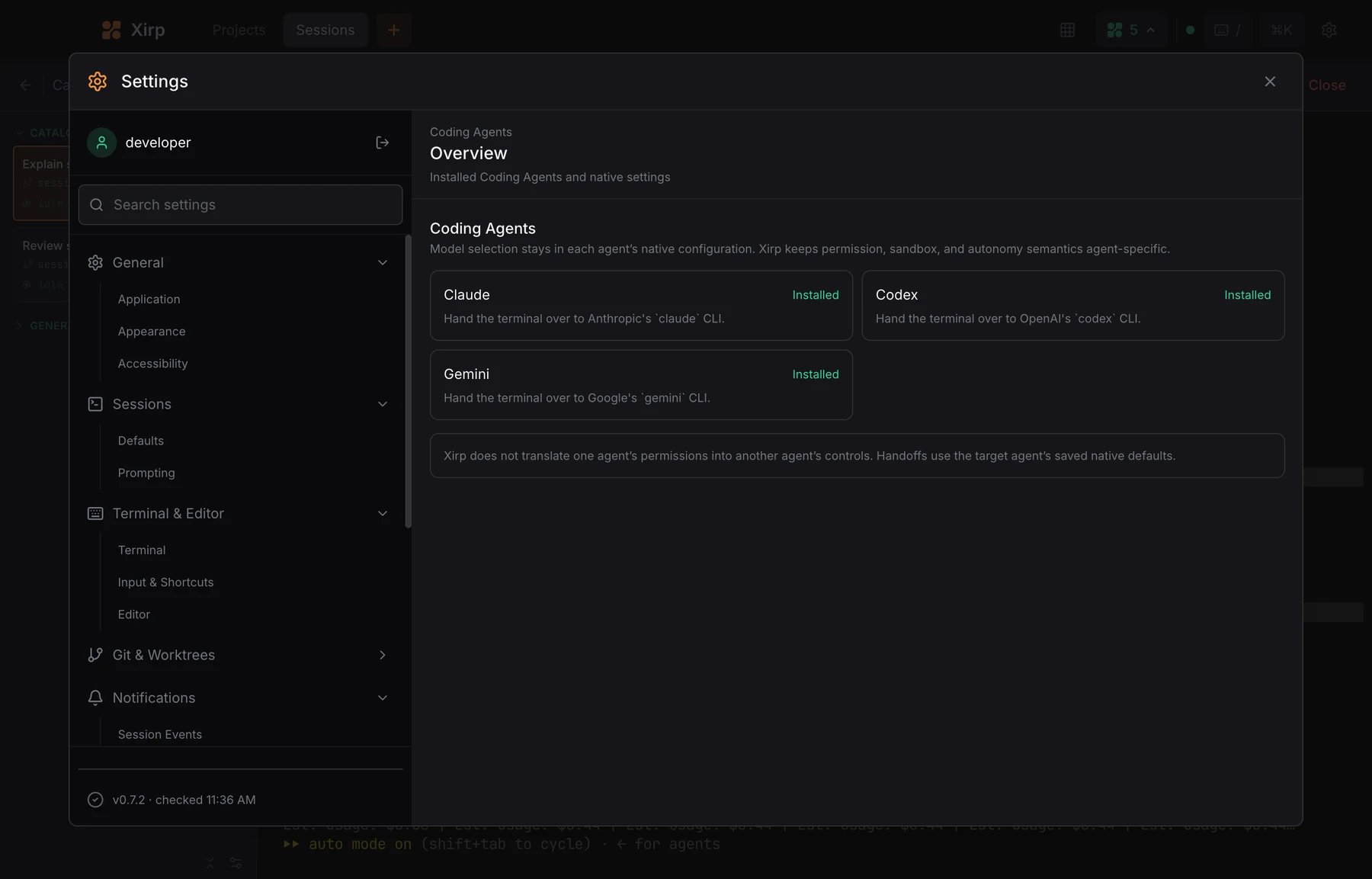
Xirp detects and launches supported agent CLIs; it does not flatten their security models into a single Spotify policy. Review Claude Code, OpenAI Codex, and Gemini CLI independently for authentication, model/provider routing, approval modes, filesystem scope, shell execution, network access, MCP configuration, environment-variable exposure, and logging. A safe selection in one CLI says nothing about another.
| Control | Xirp | Native agent | Portal |
|---|---|---|---|
| Project/session organization | Primary owner | Runs within the launched session | Can provide launch context |
| Model and provider credential | Does not replace | Primary owner | Not the native model control |
| Tool approvals and sandbox | Surfaces agent use | Primary owner | Context access is separate |
| Git worktree creation | Can orchestrate | May operate inside it | Not a sandbox |
| Organizational context access | Client/launch surface | Consumes through MCP | Identity, membership, resources, catalog |
| Transcript publication | User initiates upload | Conversation is the source material | Stores/shares in Workspace |
For a broader pattern that separates context, permission, validation, and release controls, see my production AI-agent harness guide. For hands-on Xirp session and worktree operation, use the safe setup guide.
A worktree prevents overlap, not unsafe execution
A separate Git worktree gives a session its own checkout and branch. That is valuable when several agents edit one repository: uncommitted changes and branch heads do not collide in the same working directory. It does not restrict which local processes can run, which network endpoints can be reached, which secrets can be read, whether destructive commands succeed, or whether generated code is correct.
Require the same controls you would for a native CLI: non-production credentials, least-privilege tokens, protected branches, review, tests, secret scanning, dependency controls, and an explicit release step. Do not mount production credentials simply because the task is running in a disposable worktree.
Telemetry: document the narrow claim precisely
Spotify’s Xirp FAQ says pseudonymous product telemetry excludes prompts, code, file paths, and free-text content. It also documents disabling telemetry with XIRP_TELEMETRY=0. That is useful, but it is a claim about Xirp telemetry—not about requests sent by Claude Code, Codex, Gemini CLI, an MCP server, a repository integration, or Portal.
- Record the documented event categories and exclusions in the pilot data inventory.
- Set and centrally enforce the disable flag if policy requires it.
- Observe endpoint egress to verify the deployed build behaves as expected.
- Review each native agent’s telemetry and provider data policy independently.
- Repeat the check after Xirp or agent updates; this is a beta and the surface can change.
Connecting Portal changes the trust boundary
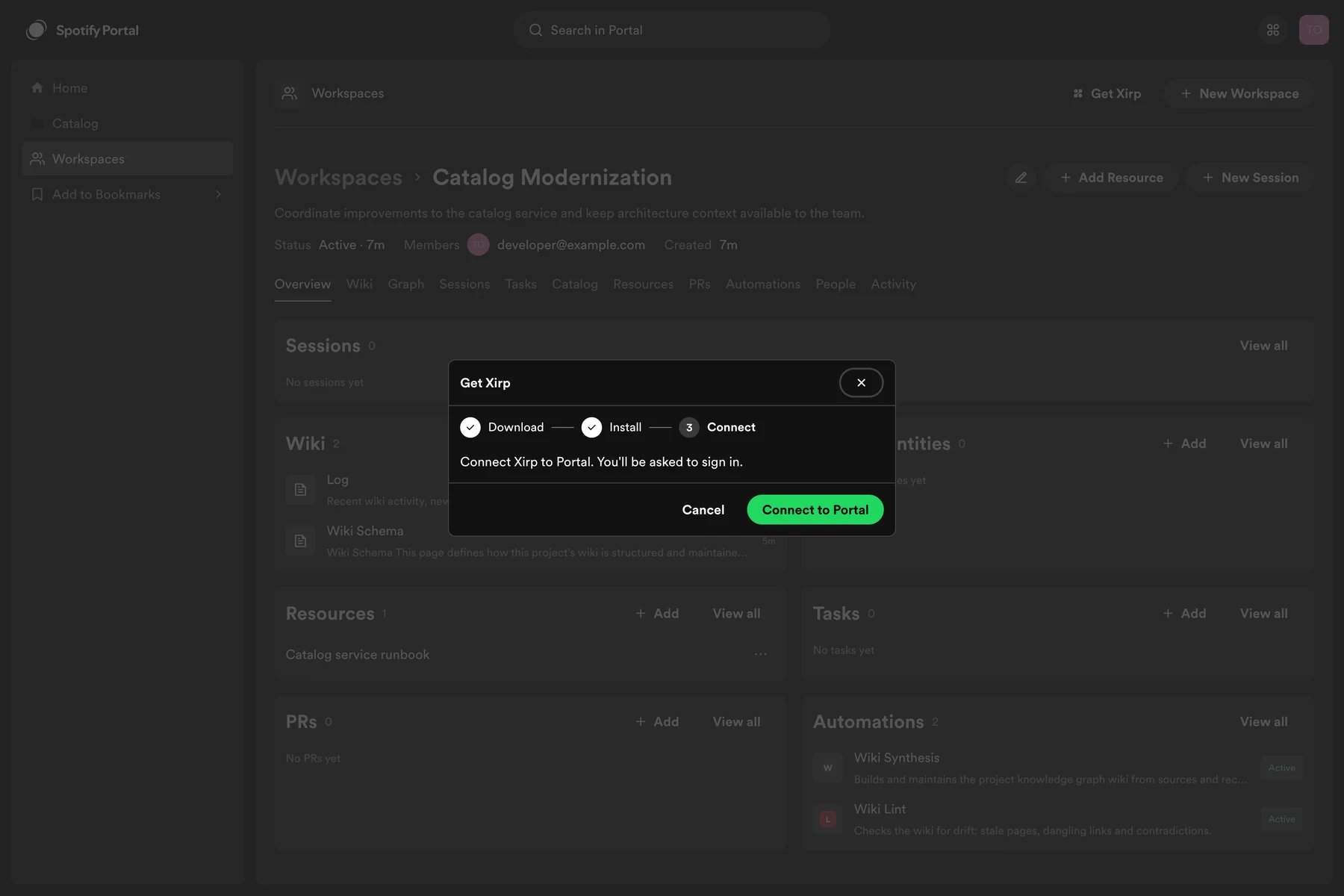
Standalone Xirp can manage local projects, sessions, worktrees, files, rules, skills, and its grid without Portal. A Portal connection adds catalog-based repository discovery, Workspace context through MCP, and optional shared session continuity. The correct security question is therefore not “Is Portal on?” but “Which identity can retrieve which Workspace resource through which integration, and who reviews the result before action?”
Audit Workspace owners and members, catalog ownership, source-location annotations, GitHub App repository selection, integrations, records, wiki pages, and session visibility. Treat retrieved text as data that can be stale, contradictory, over-permissioned, or instruction-bearing. An MCP response can improve grounding without becoming automatically authoritative.
Transcript uploads are the highest-consequence user action
Spotify documents transcript upload as explicit and manual. That is a strong default compared with automatic sharing, but the user is the final gate. The uploaded artifact may include conversation text, tool calls, file changes, reasoning, paths, and code excerpts. The documentation warns that Xirp does not automatically scrub secrets or sensitive information.
A workable upload policy
- Default deny: do not upload unless the session has reusable value and an approved Workspace.
- Classify first: prohibit credentials, tokens, personal data, customer data, regulated data, unreleased financial/product information, and third-party confidential code.
- Review the entire transcript: search both visible messages and tool/file-change details; do not review only the final answer.
- Confirm audience: inspect current Workspace membership and resource permissions immediately before upload.
- Record purpose: state why the session is reusable, its source repository, reviewer, and review date.
- Apply retention: define deletion ownership and test removal before the pilot begins.
- Prefer distilled knowledge: where possible, publish a reviewed decision or wiki page instead of a raw conversational record.
Debug exports need the same pre-transfer review
Xirp’s settings documentation provides diagnostics and export mechanisms and warns users to inspect exports before sharing. A diagnostic package can be operationally useful while containing environment details, paths, command output, integration state, or other material your normal telemetry excludes. Store it in an approved incident channel, minimize recipients, time-limit access, and delete it when the support purpose ends.
What the public preview terms mean for a pilot
The public Xirp Preview Terms are part of the technical decision because they define the maturity and responsibility boundary. This summary is operational, not legal interpretation; your counsel should read the current terms.
| Public term or limitation | Operational risk | Reasonable response |
|---|---|---|
| Early-access, pre-release, evaluation-oriented product | Behavior, availability, and interfaces may change. | Use a bounded pilot with rollback and versioned evidence. |
| No preview SLA and limited preview support commitments | Not suitable as an unmitigated critical-path dependency. | Keep the native CLI workflow available and document manual fallback. |
| No usual third-party attestations promised for the preview | May not satisfy procurement or regulated-control requirements. | Do not claim certifications; ask Spotify for applicable assurance artifacts. |
| Customer responsibility for use of third-party agents | Provider, model, account, and output risks remain yours. | Approve each provider and native agent separately. |
| Session-interaction data may be processed for documented preview purposes | Uploaded content can enter a different processing and retention context. | Minimize and review uploads; execute a privacy/legal assessment. |
| Non-public preview information and benchmarks may be confidential | Internal tests or beta observations may not be publishable. | Keep external articles and procurement records within authorized public evidence. |
A high-control pilot design
- Choose low-sensitivity repositories. Exclude production infrastructure, credentials, regulated data, customer data, and restricted third-party code.
- Use managed Macs. Enforce disk encryption, OS patching, endpoint monitoring, account lifecycle, and screen lock.
- Approve one native agent first. Fix provider, model, account type, permission mode, MCP servers, and allowed tools; expand only after evidence.
- Use least-privilege test credentials. No production tokens; short-lived credentials where possible.
- Start without Portal. Validate local Xirp behavior before adding organizational context and transcript sharing.
- Curate one Workspace. Limit members and resources; verify ownership and repository annotations.
- Disable transcript uploads initially. Enable only after the review policy, reviewer, and deletion test exist.
- Require worktrees plus review. Separate concurrent changes, run automated tests and secret scanning, and require a human merge.
- Observe egress and logs. Confirm Xirp, native agent, MCP, and Portal traffic against the approved architecture.
- Define stop conditions. Pause on unexpected upload, unscoped access, unrecoverable state, missing audit evidence, or policy-bypassing permissions.
Pilot evidence checklist
| Gate | Pass evidence | Owner |
|---|---|---|
| Endpoint | Managed Mac, encryption, patch state, Xirp-home permissions | IT/security |
| Repository scope | Named allowlist and data classification | Engineering owner |
| Native agent | Provider approval, credential scope, permissions, sandbox, MCP list | AI platform/security |
| Network | Observed destinations match approved data-flow map | Security |
| Portal | Identity, Workspace membership, RBAC, selected repositories | Portal admin |
| Knowledge quality | Resources have owner, provenance, review date, conflict path | Workspace owner |
| Transcript | Default-deny policy, human reviewer, prohibited-data list, deletion test | Privacy/security |
| Change safety | Worktree, tests, scan, review, protected merge/release | Repository owner |
| Fallback | Native CLI path works without Xirp/Portal | Pilot lead |
| Exit | Credential revocation, local cleanup, Portal removal, retained-evidence plan | IT/pilot lead |
Proceed, limit, wait, or reject?
- Proceed with a limited pilot when managed Macs, low-sensitivity repos, approved native-agent controls, review, logging, and a rollback path are available.
- Proceed without Portal when local session orchestration is useful but organizational-context access or transcript governance is not ready.
- Wait when you require Windows/Linux, server/SSH-hosted sessions, production SLA, specific attestations, or mature administrative evidence not present in the public preview material.
- Reject for the current use case when sensitive data cannot be separated, native-agent permissions cannot be constrained, or raw session content cannot be reviewed before sharing.
Questions Spotify should answer before production procurement
The public corpus does not fully answer retention and deletion guarantees, subprocessor details, data residency, enterprise audit events, desktop update signing and release controls, incident commitments, general-availability roadmap, future support for Windows/Linux or remote execution, or which production assurances will apply after preview. Ask for current contractual and security documentation; do not fill gaps with marketing inference.
Bottom line
Xirp’s documented design contains useful safety properties: local project registration, optional Portal, explicit transcript upload, worktree separation, and native-agent transparency. None is a complete security boundary. A defensible pilot separately governs the Mac, repository, agent/provider, permissions, network, Portal identity, Workspace knowledge, transcript, and release path—and treats preview maturity as a constraint rather than a footnote.
