
Short answer: NVIDIA reports that confidential computing (CC) on an eight-GPU DGX B200 retained 96.1%–98.2% of CC-off output-token throughput, with 1.2%–4.3% mean time-per-output-token (TPOT) overhead. The result came from one specific DeepSeek-R1-0528-NVFP4 and TensorRT-LLM configuration. Use the same model, software, hardware, token lengths and concurrency on both sides of a CC-on/CC-off comparison before applying the percentages to your own service.
NVIDIA published the benchmark on September 22, 2026, alongside details on the TensorRT-LLM changes used to reduce confidential-inference overhead. This guide records the test matrix, gives a controlled comparison plan, and explains what the published result can and cannot tell an AI platform team.
What NVIDIA measured on one DGX B200
The NVIDIA performance-engineering team compared CC off with CC on while holding the model, hardware, framework version, sequence lengths, parallelism and concurrency constant. Its published workload and stack were:
| Setting | NVIDIA configuration |
|---|---|
| GPU system | 1 DGX B200 with 8 NVIDIA B200 GPUs |
| CPU confidential-computing platform | Intel TDX |
| Model | nvidia/DeepSeek-R1-0528-NVFP4 |
| Inference stack | TensorRT-LLM 1.3.0rc22, PyTorch backend; NCCL 2.30 |
| Input and output | 32K input tokens / 1K output tokens |
| Concurrent requests | 1, 2, 4, 8 and 16 |
| Parallelism | Tensor parallelism 8; expert parallelism 1; pipeline parallelism 1 |
| KV cache | FP8 |
| Guest and host | Ubuntu 24.04.4 guest, 256 vCPUs and 2 NUMA nodes; Ubuntu 25.10 host |
| Host and guest kernels | Host 6.17.0-20-generic; guest 6.8.0-124-generic |
| GPU VBIOS and power limit | FW 1.4.x [97.10.64.00.0C]; 1,000 W |
| Other reported versions | Driver 595.71.05; CUDA 13.2; OpenSSL 3.6.0; Docker with NVIDIA Container Toolkit |
Across those five concurrency levels, NVIDIA reported the following normalized results. Throughput retained is output tokens per second with CC on divided by the CC-off baseline. TPOT overhead compares mean TPOT in the two runs; lower TPOT is better.
| Concurrent requests | CC-on output throughput retained | CC-on mean TPOT overhead |
|---|---|---|
| 1 | 98.2% | 1.2% |
| 2 | 98.0% | 3.2% |
| 4 | 96.1% | 4.3% |
| 8 | 96.8% | 3.5% |
| 16 | 96.8% | 3.1% |
These are NVIDIA-reported results for the listed DeepSeek workload, not an independent DMT benchmark. The throughput percentages are relative to NVIDIA’s CC-off baseline; the original figure also labels absolute output tokens per second, reproduced below.
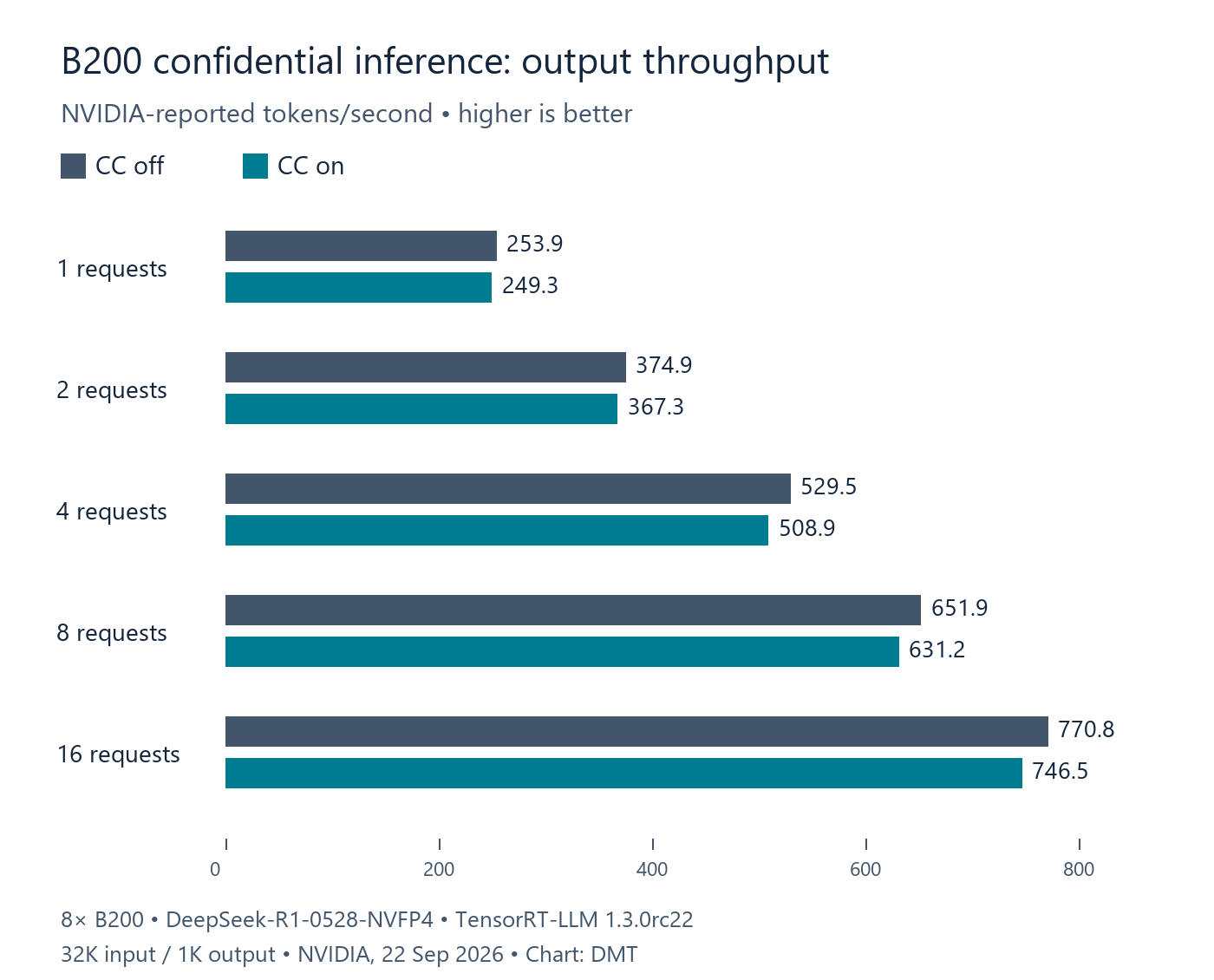
| Concurrent requests | CC off, output tok/s | CC on, output tok/s |
|---|---|---|
| 1 | 253.9 | 249.3 |
| 2 | 374.9 | 367.3 |
| 4 | 529.5 | 508.9 |
| 8 | 651.9 | 631.2 |
| 16 | 770.8 | 746.5 |
How to set up a controlled CC-on vs CC-off comparison
A useful comparison changes the confidential-computing state and keeps the rest of the serving stack fixed. Start on a supported B200 system with an approved TDX or SEV-SNP platform, a confidential VM, a pinned model revision, and the same guest, driver, CUDA, container, framework and NCCL versions for both passes. Follow NVIDIA’s current compatibility and deployment documentation for the exact host and firmware you have.
The unexecuted manifest below is a measurement template, not an executable benchmark command:
{
  "model": "nvidia/DeepSeek-R1-0528-NVFP4",
  "backend": "TensorRT-LLM / PyTorch",
  "input_tokens": "32K",
  "output_tokens": "1K",
  "concurrency": [1, 2, 4, 8, 16],
  "tensor_parallel": 8,
  "expert_parallel": 1,
  "pipeline_parallel": 1,
  "kv_cache": "FP8",
  "comparison_states": ["CC off", "CC on"],
  "keep_constant": [
    "GPU host and GPU count",
    "CPU TEE, guest image, vCPU and NUMA layout",
    "model files and tokenizer revision",
    "driver, CUDA, TensorRT-LLM, NCCL and container",
    "request set, input/output lengths and concurrency"
  ],
  "record": [
    "output tokens per second",
    "mean and p50/p95/p99 TPOT",
    "TTFT, request errors and GPU/CPU utilization",
    "CC state and attestation result"
  ]
}
For each concurrency point, run the same requests in both states and compute the two comparisons:
- Throughput retained (%) = 100 × (CC-on output tokens per second ÷ CC-off output tokens per second)
- Mean TPOT overhead (%) = 100 × ((CC-on mean TPOT ÷ CC-off mean TPOT) − 1)
For a reader-run test, warm both configurations before collecting measurements, repeat each point, and report the spread as well as the mean. Add your production request-rate distribution, context lengths, output lengths and serving SLA after reproducing the reference shape. Those controls help show whether a slowdown is repeatable and whether the benchmark resembles your service; NVIDIA’s post does not publish its full run count, warm-up procedure or raw request traces.
Check the GPU state before each pass
NVIDIA’s deployment guide documents privileged CC mode changes and a reset after changing modes. The following per-GPU commands show the guide’s flags; replace xx:00.0 with the GPU’s actual PCI bus/device address, repeat for every B200 in the test, and use the approved helper path for your host. These examples are unexecuted. CC mode changes are system-administration actions, reset the GPU and persist across reboots, so perform them on an isolated test system with a maintenance plan.
# Set one GPU to the baseline state, then reboot/reset as required by the platform.
sudo python3 ./nvidia_gpu_tools.py --set-cc-mode=off --reset-after-cc-mode-switch --gpu-bdf=xx:00.0

# Set the same GPU to confidential-computing mode for the paired pass.
sudo python3 ./nvidia_gpu_tools.py --set-cc-mode=on --reset-after-cc-mode-switch --gpu-bdf=xx:00.0

# Inside the guest, record the reported configuration before benchmarking.
nvidia-smi conf-compute -q
Confirm the CC status and complete the required attestation flow before treating a CC-on run as a security test. A throughput benchmark alone does not verify a threat model or prove that an attestation policy is configured correctly. NVIDIA’s deployment guide also notes that mode settings may need to be applied from the guest when host Secure Boot policy prevents the host-side operation; keep your existing security policy intact and follow your organization’s approved deployment path.
Why TensorRT-LLM needs CC-aware changes
Confidential execution changes how data moves between the CPU and GPU and how the runtime measures work. NVIDIA describes four adaptations in the B200 test stack:
| Path | What changes under CC | TensorRT-LLM response described by NVIDIA |
|---|---|---|
| Host to GPU | Transfers pass through an encrypted bounce buffer because the GPU cannot directly access protected confidential-VM memory. Pinned memory may lose its usual asynchronous-transfer advantage. | Choose pageable memory on affected paths instead of always pinning memory. |
| GPU to host | Protected token and sampling-data copies can block a caller during decode. | Move repeated readback to an asynchronous worker so the main scheduler can keep preparing decode work. |
| Kernel autotuning | CUDA-event timestamps were unstable in the tested CC configuration and could lead the autotuner to choose a slower tactic. | Use the GPU %globaltimer for tactic timing in CC while retaining CUDA events outside CC. |
| Multi-GPU communication | NVIDIA says NVLS multicast is unavailable in B200 CC mode. An NCCL symmetric path can still add registration and synchronization costs before falling back to a non-multicast collective. | Check availability and select a communication algorithm for the message size, topology and workload. |
The pinned-memory and asynchronous-worker changes are visible in NVIDIA’s merged TensorRT-LLM PR #11573; the autotuner change is described in PR #11657. Framework version matters: record the exact container tag and configuration you ran, rather than assuming another TensorRT-LLM build includes identical CC behavior.
How to read the result without overgeneralizing
The 96.1%–98.2% throughput-retention range describes this DeepSeek-R1-0528-NVFP4 configuration, not every B200 model, framework, context length or load pattern. In NVIDIA’s rows, concurrency 4 has the lowest throughput retained (96.1%) and the highest mean TPOT overhead (4.3%). That is a useful example of why teams should report the whole concurrency curve instead of carrying a single average into capacity planning.
A separate August 27 arXiv preprint also tests TDX plus NVIDIA CC on B200, using multiple models and frameworks; it reports roughly 1%–3% overhead for its well-configured inference cases. Tinfoil’s June benchmark uses different 8×B300 and H200 configurations. Keep each result attached to its model, software and traffic matrix: the percentages are not a pooled estimate and neither study is a reproduction of NVIDIA’s September 22 DeepSeek run.
NVIDIA’s September post is useful for identifying the stack, comparison formulas and runtime changes. It does not include an executable benchmark command, a reported repeat count or confidence intervals. The results are vendor-run and DMT did not independently measure them. A B200 performance result also says nothing by itself about model quality, deployment cost, application tail latency or whether your attestation and key-release controls meet a particular policy.
Related DMT coverage
For a separate look at how to read vendor accelerator comparisons, see DMT’s NVIDIA Vera Rubin MLPerf analysis. For enterprise questions about where data, control and operational responsibility sit in a private-AI deployment, see the sovereign AI controls checklist.