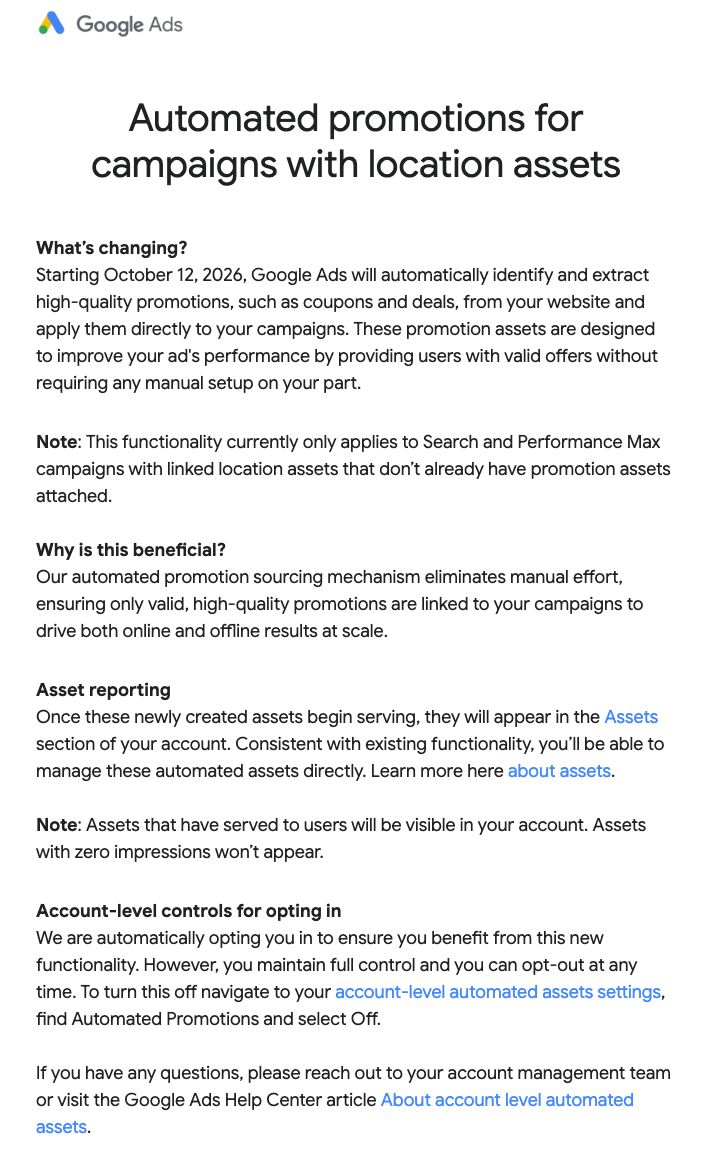
Google Ads Automated promotions finds offers on website landing pages and can attach them to eligible Search and Performance Max campaigns. Google’s current help page lists the campaign conditions and controls. The October 5 report of a Google email says some advertisers were told their accounts would be opted in starting October 12, 2026. That reported date does not establish a universal rollout or the saved setting in your account. Check the account you manage directly, and use the asset report only to inspect offers that are visible there. Google’s Automated promotions documentation is the primary source for the feature’s eligibility and controls.
Google Ads update · checked 6 October 2026
Decision first: if every offer needs prior approval, set Automated promotions to Off in the account-level setting and verify the saved state reads Off. A manual promotion only bypasses automation on a campaign while that manual promotion is currently running. Otherwise, leave the feature On only if your website offers are current and you can accept Google’s extraction and revalidation behavior.
What Google Ads Automated promotions does
Google says it identifies and extracts promotional offers directly from website landing pages. An offer such as “20% off on black sweaters” may then appear as a promotion asset in an eligible Search or Performance Max campaign. The feature is attached at the account-level automated-assets layer, but campaign eligibility still matters.
This is different from manually uploading a promotion asset. Manual assets are useful when the advertiser needs exact promotional content or start and end dates; see Google’s promotion-asset guidance. Automated promotions are useful when the website is the current source of truth and the advertiser is prepared to review what Google finds.
Search Engine Roundtable reported the new help document on 7 September 2026 and linked to Google’s page. That report is useful discovery context; Google’s own documentation controls the operational claims in this guide. Read the independent discovery report for the attributed announcement context.
The October 12 notice: scope and account checks
On October 5, Search Engine Roundtable reported that Google had emailed some advertisers about automatically identifying website offers and opting accounts in from October 12, 2026. The reproduced notice names Search and Performance Max campaigns with Location Assets that do not already have promotion assets. The report does not establish that every advertiser received the notice, that the timing is worldwide, or that any other account is already on. Google’s public help page explains the feature and how to inspect its setting, but does not publish this October 12 date.
| Evidence | What it can confirm | What it cannot confirm by itself |
|---|---|---|
| The Google email received by the account | The date and wording of the notice sent to that recipient. | That another account received the same notice or has the same current setting. |
| Automated promotions under account-level automated assets | The saved On or Off state for that account when checked. | Which campaigns are eligible or whether an offer has appeared. |
| A Promotion asset labelled Google AI | A visible, automatically sourced asset and the sourcing details Google exposes for it. | Whether the setting is Off when no row appears. The email screenshot reproduced in the report says zero-impression assets may not be visible. |
| The campaign’s current settings | Whether an active Search or Performance Max campaign has Location Assets and no manual promotion currently running. | A guarantee that Google will select or serve a promotion. |
For an account covered by the notice, check and record the saved setting in that account before making a decision. If the control is missing or its state cannot be confirmed, treat the account state as unknown. Do not treat an empty asset list or another advertiser’s screenshot as proof that the feature is Off.
Eligibility at a glance
Use this table before enabling the setting or interpreting an automatically created promotion. These conditions come from Google’s current eligibility guidance.
| Check | Google’s documented condition | Operator decision |
|---|---|---|
| Campaign type | The campaign is active Search or Performance Max, including Local Ad campaigns. | Review campaign status and scope before expecting an asset to serve. |
| Location Assets | The eligible campaign has Location Assets attached. | Confirm the correct location group is linked to the campaign. |
| Manual promotions | Google says it bypasses a campaign that already has manual promotions running. | Choose which campaigns should use exact manual control and which may use automated sourcing. |
| Website offer | Google extracts active offers from landing pages and verifies that an offer is still visibly available. | Keep the offer, terms, and landing-page experience current and easy to inspect. |
| Policy compliance | The campaign must comply with standard Google Ads advertising policies. | Resolve policy issues before treating a missing promotion as a technical failure. |
Meeting these conditions makes a campaign eligible; it does not guarantee that an offer will be shown on every impression. Google’s page describes eligibility and sourcing, not a serving guarantee.
Before you turn Automated promotions on
Start with the website because that is where the feature sources the offer.
- List the landing pages that contain active offers and write down the exact offer wording a customer should see.
- Check that the offer is visibly present on the page a visitor reaches from the ad. Do not rely on a promotion that appears only after an unrelated interaction.
- Record the campaign, Location Asset, and any manual promotion already attached. A manual promotion changes how Google handles the automated option.
- Decide whether the business can accept revalidation that may refresh or stop an extracted offer when the page changes.
- Choose manual promotion assets for campaigns where a fixed start date, end date, exact copy, or tightly controlled eligibility statement matters.
This review fits alongside a broader Google Ads AI workflow review. It answers a narrower question: whether a website-sourced promotion should be allowed and how the resulting asset should be checked.
How to enable or disable it
Google documents the following account-level path:
- Open Campaigns and select Assets.
- From the filter bar, open the three-dot More menu and choose Account-level automated assets.
- On that page, open the three-dot menu and select Advanced settings.
- Open the Automated promotions setting and choose On (recommended) to opt in.
To opt out, follow the same path and choose Off in the Automated promotions menu. Google says a reason may be requested. Save the account decision with the date, responsible owner, and campaigns reviewed so a later operator can distinguish an intentional opt-out from a missing asset. Because the control is account-level, record the setting separately for each relevant client account.
The interface can change. If the menu labels differ, use Google’s current Automated promotions help page as the source of the current path rather than relying on an old screenshot.
How to audit what Google extracted
After reviewing the account setting, inspect the asset record. A missing Promotion row does not establish that the setting is Off: the Google email screenshot reproduced by Search Engine Roundtable says assets with zero impressions may not be visible. Check the saved setting separately, then inspect asset rows using a date range that covers the activity you are investigating.
- Open Campaigns > Assets.
- Filter Asset type to Promotion.
- Use the Added by column to identify automated promotions labelled Google AI.
- Hover over the Google AI label for sourcing details.
- Hover over the promotion name to inspect additional asset details, including the headline.
Compare the extracted asset with the landing page that contains the offer. Record the URL, visible offer wording, campaign, Location Asset, asset status, and review time. This makes it possible to explain why a promotion appeared or disappeared without treating an automated extraction as an unexplained campaign edit.
What the less-than-24-hour eligibility window means
Google’s help page says each automated promotion is eligible to serve for a limited period of less than 24 hours. It may be re-enabled after that period if Google’s systems can continuously verify that the promotion remains visibly available on the website. Google also says this behavior is expected to change when its systems can extract promotion start and end dates.
That wording is a revalidation rule, not a 24-hour serving SLA. It does not mean an offer will show for exactly 24 hours, and it does not mean a landing page can safely keep yesterday’s offer live. If the business needs a fixed promotional calendar, use a manual promotion and maintain the landing-page and campaign dates together.
Illustrative retailer example
Illustrative scenario, not an observed campaign result: a retailer publishes “20% off black sweaters” on a product landing page. The retailer has an active Performance Max campaign with a Location Asset and no manual promotion running.
- The operator records the offer text and checks that the landing page visibly shows it.
- The operator enables Automated promotions through the account-level automated-assets settings.
- The operator filters Assets to Promotion and checks whether the asset is labelled Added by Google AI.
- The operator opens the sourcing details and compares the extracted headline with the live landing page.
- If the retailer needs the offer to run only from Friday 09:00 to Sunday 23:59, the operator uses a manual promotion instead of treating the automated asset as a fixed schedule.
The example shows the decision sequence. It does not establish that Google will extract the offer, that the asset will serve, or that the campaign will improve.
How to review performance
Google recommends segmenting campaign reports by click type to evaluate how customers interact with the offer. Keep that view alongside the campaign’s overall impressions and conversions. A low number of direct clicks on the promotion bubble does not, by itself, explain the campaign’s total result.
Use a simple review record:
| Review field | Why it matters |
|---|---|
| Campaign and date range | Defines the population being reviewed and prevents mixed campaign settings. |
| Promotion asset and Added by value | Separates a Google AI extracted asset from a manual promotion. |
| Click type | Shows interaction with the promotion within the campaign report. |
| Campaign impressions and conversions | Provides the broader context Google says to evaluate. |
| Landing-page offer state | Explains whether the source offer was visible and current during the review. |
Do not describe the feature as increasing conversion rate or revenue unless a properly designed account analysis supports that claim. Google’s help page provides measurement guidance and a qualitative caution; it is not an independent performance study.
For attribution boundaries and broader campaign measurement, use the Google Ads measurement stack guide. Keep the Automated promotions audit as an asset-level operational record rather than folding it into an unsupported incrementality conclusion.
Automated or manual: a practical choice
| Use Automated promotions when… | Use a manual promotion when… |
|---|---|
| The landing page is the current source of truth for an active offer. | The promotion needs exact start and end dates. |
| The campaign has Location Assets and no manual promotion. | The campaign must use exact approved copy or terms. |
| The team can inspect extracted assets and revalidation behavior. | A promotion calendar requires a deliberate launch and stop action. |
| The business accepts that eligibility depends on visible website availability. | A legal, commercial, or inventory constraint requires a human approval before serving. |
The choice can differ by campaign. An account may keep automated sourcing available while using manual promotions for campaigns with fixed promotional windows.
This guide answers how to control and audit website-sourced promotion assets. It does not replace Google’s advertising policies, account-specific eligibility checks, or a properly designed performance analysis.