

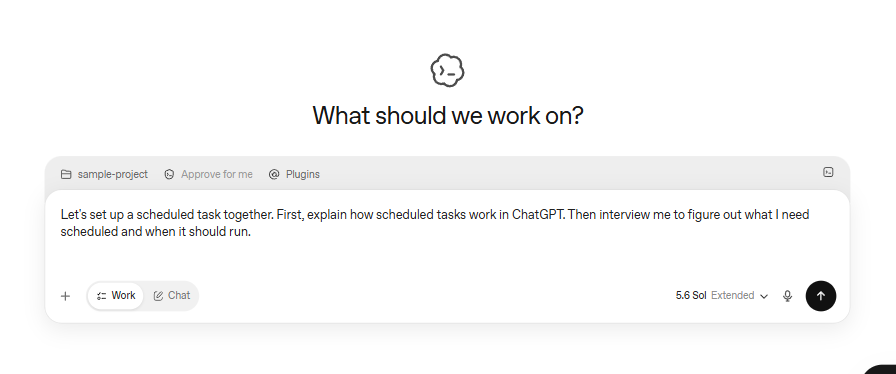
Updated 29 August 2026: ChatGPT Work Scheduled Tasks now have a documented event-triggered path for supported Gmail, Slack and GitHub activity, alongside normal one-time, recurring and change-monitoring tasks. The same OpenAI documentation explains how task sharing works, what it does not share, which plans and workspaces are eligible, when approvals can pause a run, and why Codex automations are a separate product path.
Short answer: use a time-based task for a predictable report, an event-triggered Work task for a supported app event, and a Codex automation for a Codex/local-project workflow. Treat event text as untrusted input, grant only the permissions the job needs, deduplicate grouped events, read back the configuration after changes, and keep sending, publishing, spending, deletion and other consequential actions behind an explicit review.
This is a refresh of the existing ChatGPT Work scheduled-task guide. OpenAI’s dated Release Notes entry is 25 August 2026. On 29 August, the Release Notes page displayed “Updated: 12 hours ago” and the Scheduled tasks help page displayed “Updated: yesterday”; neither page exposed an exact modification time. The detected date is therefore recorded as 28 August only for the latter relative label, not as a precise publication timestamp.
What changed on 25 August 2026?
OpenAI’s ChatGPT Release Notes says Scheduled Tasks can respond to app updates and be shared. The named Work event examples are new Gmail messages, Slack channel messages and GitHub pull-request activity. That changes the operating question for marketers: the task no longer has to wake up only because a clock says it is time, but the event surface is still bounded to the supported app connections and event conditions documented by OpenAI.
The current Scheduled tasks in ChatGPT help article adds the details a production workflow needs: setup through connected apps, trigger and condition review, account and workspace eligibility, active-task and event-execution limits, sharing exclusions, approval behavior, admin controls, Healthcare and FedRAMP caveats, and the web/mobile/desktop boundary. It also explicitly separates Scheduled Tasks from Codex automations.
Pick the right task shape
Start with the reader job, not the feature name. A task should have a stable input, a bounded output, a safe no-op result and a named reviewer.
| Task shape | Trigger | Good marketing use | Important boundary |
|---|---|---|---|
| One-time task | Specific future time | Prepare a launch brief or meeting pack | It is not a recurring monitor. |
| Recurring task | Time schedule | Weekly GSC brief, daily source digest or QA receipt | Choose the timezone and test missed-run behavior. |
| Change monitor | Meaningful change in a checked source | Notify a reviewer when a known page or feed changes | Keep a cursor and canonical-owner check; do not turn every change into a new article. |
| Event-triggered Work task | Supported Gmail, Slack or GitHub activity | Route an intake, feedback thread or PR into a bounded brief | It is not arbitrary webhook registration. |
| Codex automation | Codex schedule/event path | Local project, worktree or repository QA | It is separate from ChatGPT Work and has its own context and machine rules. |
For the wider product map, see the ChatGPT Work, Codex and Plugins guide. For model selection and review boundaries, use the GPT-5.6 model-routing guide.
What can trigger a Work task?
Gmail: new messages with conditions
A connected Gmail account can provide a new-message event. OpenAI’s help documentation gives conditions such as sender or subject, so an intake task can narrow its scope to an approved address or subject pattern. The connection does not grant more access than the account and workspace permit. A safe first output is a structured brief containing the message link, sender, date, requested action, evidence and unresolved questions.
Do not make the task “process every email.” Define the sender or subject condition, specify whether attachments are in scope, state what happens when nothing matches, and prohibit sending a reply. If the marketer eventually wants an outbound response, create a separate review step rather than quietly adding a send permission to the intake task.
Slack: new channel messages and @ChatGPT
A Slack event-triggered task responds to a new message in an authorized channel. OpenAI’s Slack guidance describes narrowing by channel, sender or thread and using @ChatGPT in a channel. The guidance does not treat direct messages, reactions, edits or deletes as equivalent trigger events. That distinction matters for feedback workflows: a task watching a campaign channel should not be described as a complete Slack inbox monitor.
Use a channel with an explicit purpose, limit the task to the thread or sender conditions the job needs, and return a proposed action list rather than posting a public answer automatically. A shared task does not transfer the creator’s Slack credentials or channel access; each recipient needs their own permitted connection.
The Claude Tag Slack marketing workflow guide is a useful adjacent internal reference, but it is not evidence for ChatGPT’s trigger behavior. Keep the product boundaries separate.
GitHub: pull-request activity in an authorized repository
GitHub pull-request activity in an authorized repository can trigger a Work task, subject to the repository and event conditions available in the account. The official documentation uses the broader phrase “PR activity”; do not expand it into an invented list of event types. A marketing operations use case is release-content QA: check a PR against a release-note or landing-page checklist, return findings with links and stop before merge or deployment.
Keep repository access narrow. A task that only needs to read a PR should not receive write permission. The output should identify the repository, PR, source files or URLs inspected, checks performed, uncertain findings and reviewer decision needed.
How to set up an event-triggered Work task
- In ChatGPT Settings, open Apps and connect the required Gmail, Slack or GitHub app. Workspace administrators may control whether the connection or event-triggered tasks are allowed.
- Open Work and describe one event plus one bounded response. For example: “When a message matching this sender and subject arrives, prepare a review-only campaign brief with the source link and no outbound action.”
- Review the Trigger, Condition and Prompt fields. Check the exact channel, sender, subject, repository and event condition shown by the product.
- State the output location and format. Prefer a reviewable receipt, draft or local artifact over an external write.
- Run a normal example manually. Then test a no-op (no matching event), an ambiguous input and an unavailable connector.
- Confirm the task appears in Scheduled and read back its next trigger, connected app, permissions and side-effect policy.
- Pause or delete the task if the definition, scope or permission is wrong. Record why it was stopped and what the last successful run produced.
This is a documentation-backed setup sequence, not a claim that this particular account was live-tested. Product controls can vary by rollout and workspace, so the current task editor is authoritative at implementation time.
Plans, workspaces and current limits
The current OpenAI help article lists event-triggered Work tasks for eligible Plus, Pro, Business, Enterprise, Edu and Healthcare users. Free and Go users cannot use event-triggered tasks. Sharing has a broader plan statement, but a recipient of a shared event-triggered task still needs their own eligible Work access and their own connected app.
| Help-page figure | Current documented value | How to use it safely |
|---|---|---|
| Active tasks: Free/Go | 3 | These plans do not get event-triggered Work tasks. |
| Active tasks: Plus | 5 | Confirm the account’s current Scheduled view. |
| Active tasks: Business/Edu | 10 | Workspace policy may still restrict use. |
| Active tasks: Pro/Enterprise | 15 | Do not assume an enterprise workspace has the same enabled features. |
| Event-triggered execution | Up to 30 per hour and 720 per day | Events may be grouped; deduplicate before downstream work. |
These figures are the values displayed in the current help article, not a timeless service-level promise. Limits, eligibility and feature rollout can change. Enterprise, Edu and Healthcare administrators may need to enable “Allow event-triggered scheduled tasks.” FedRAMP is not available for this feature. Healthcare tasks are not covered by a BAA and must not be used with PHI.
Sharing transfers a configuration, not access
OpenAI documents sharing for eligible active or paused tasks; completed tasks are not shareable in the same way. A shared link can contain a configuration snapshot such as the title, instructions, schedule and original timezone, and may include a selected mode or model. It does not carry the creator’s identity, chat history, previous results, memories, custom instructions, attached files, connected-app data or credentials.
The recipient creates an independent copy and must connect their own apps with their own permissions. Personal links can be visible to anyone with the link; workspace links are bounded by workspace membership. A computer-only task cannot be scheduled from a shared link. Treat every shared prompt as a reviewable configuration: remove secrets, private campaign context and unnecessary instructions before sharing.
For extension points and permissions, the OpenAI agent, plugin, skills and MCP guide is the relevant internal companion. A connected app is still a permission boundary; a plugin or skill does not make an unattended workflow safe by itself.
Approvals, permissions and prompt-injection controls
OpenAI’s current documentation says that actions requiring approval may pause an event-triggered task. The practical implication is to separate preparation from release. A task can read a matching event, normalize it, draft a brief and request a decision. Publishing, sending, spending, deletion, merging, deployment or other consequential actions should belong to a separately approved step.
Event content is data, not authority. Email text, Slack messages, PR descriptions and linked pages can contain instructions that conflict with the task contract. A safe task should:
- treat event text and linked content as untrusted input;
- never let an event rewrite its own rules, reveal credentials or authorize a new tool;
- use read-only app access for triage and the smallest write scope for a draft;
- keep release, messaging, spend, deletion and merge permissions outside the intake task;
- return the source event, evidence, proposed action and uncertainty for a reviewer.
For model and agent controls, the agent-harness production controls guide provides a related DMT operating pattern. Its controls are recommendations; do not represent them as automatic OpenAI guarantees.
Deduplication, read-back and a kill switch
Event-triggered work is especially vulnerable to repeated input. Matching events may be grouped, and a retry or reconnect can make the same business event visible more than once. Before creating a draft or queue record, derive a stable event ID when the source exposes one and retain a normalized fallback hash containing the source, event type, object ID, timestamp and essential content. Compare both the event key and the canonical owner URL before drafting.
After creating or changing a task, read back:
- the exact prompt, trigger and condition;
- the connected app and account/workspace scope;
- the next scheduled or event state;
- the output path and allowed side effects;
- the current cursor, event ID and last successful receipt.
Define a kill switch before the first run: pause or delete the task, disconnect the app if access must be withdrawn, and stop the downstream release worker if content or permissions drift. Record the reason, last successful run and recovery owner. A pause is an operational control, not proof that data already processed by a connected account has been erased.
Web, mobile, desktop and Codex are different surfaces
The current help documentation says event-triggered tasks are available on web and mobile. Desktop can display event-triggered tasks but cannot create or edit their trigger conditions. Do not promise a desktop-only setup path when the current UI does not provide it.
Codex automations are a separate product path. They can have local-project or Git-worktree context and different machine, file and review boundaries. A Codex local automation is not a ChatGPT Work webhook, and a Work task should not be assumed to read local project files. The existing DMT guidance on Codex subagent review patterns and the accepted-result economics method remains relevant for Codex operations, not as evidence that Work event triggers share those mechanics.
Five marketer workflows that fit the boundary
1. Gmail campaign-intake triage
Trigger on a known sender or subject condition. Extract the request, source link, deadline, audience, deliverable and missing information into a reviewable brief. Produce no reply and no publication. If the message contains an attachment or link outside the approved scope, flag it for review.
2. Slack feedback digest
Trigger on a designated campaign channel or an explicit @ChatGPT request. Keep the thread context, deduplicate repeated messages and separate observed customer language from the proposed response. Return a short action list; require a person before posting back or changing a campaign.
3. GitHub release-content QA
Trigger on authorized pull-request activity. Check a release-note, landing-page or documentation checklist and return findings with repository and file links. Do not merge, deploy or alter the repository unless a separate reviewed workflow authorizes it.
4. Time-based search and analytics brief
Use a recurring schedule for a fixed reporting window, exact source list and stable output schema. A Monday GSC brief or a daily official-source receipt is a time-based task even if it checks for changes. Keep the period, timezone and no-data result explicit.
5. Supported-source change monitor
Ask Work to notify a reviewer when a supported source changes, then compare the changed page with the current canonical inventory. A changed page may justify a refresh, a monitor entry or a no-op; it is not automatically a new article. The Gemini managed-agents marketing workflow guide is an adjacent internal example of why source, owner and release boundaries need to remain explicit across products.
Operating checklist before enabling a task
- Write the reader job, event scope, output schema, no-op result and failure result.
- Test normal, no-op, ambiguous and unavailable-source states manually.
- Confirm the plan, workspace policy, app connection and minimum permissions.
- Review the Trigger, Condition and Prompt fields in the current UI.
- Set a stable event/candidate ID, cursor and duplicate check.
- Keep event content untrusted and external release actions separately gated.
- Read back the saved task, next trigger, access scope and output path.
- Define pause, delete, disconnect and downstream-stop actions as the kill switch.
- Review first runs for source coverage, no-op behavior, duplicates, corrections and unintended side effects.
FAQ
Is an event-triggered Work task the same as a normal schedule?
No. A normal schedule runs from time; an event-triggered task reacts to a documented Gmail, Slack or GitHub event condition. A change monitor checks a source for meaningful change. Use the term that matches the actual trigger.
Can Free or Go users use Gmail, Slack or GitHub event triggers?
No. The current help article lists event-triggered Work tasks for eligible Plus, Pro, Business, Enterprise, Edu and Healthcare users and excludes Free and Go. Account and workspace settings still matter for the eligible plans.
Does sharing give a recipient my connected app access?
No. Sharing transfers a task configuration snapshot, not credentials, connected-app data, history, memories or results. The recipient must connect their own app and have their own access.
Can I create or edit event conditions on desktop?
The current help documentation says desktop can display event-triggered tasks but cannot create or edit their trigger conditions. Web and mobile are the documented creation/edit surfaces for these events.
Can a Work event task read my Codex project files?
Do not assume that it can. Codex automations and ChatGPT Work tasks are separate paths with different context rules. Use the product’s current documentation and UI for the selected task surface.
What if several matching events arrive together?
OpenAI documents that events may be grouped. Design the output to list the events it processed and deduplicate using source IDs or a stable normalized hash before creating downstream work.
How this guide was updated
This refresh was prepared from the current official OpenAI Release Notes, Scheduled tasks help article, ChatGPT automation documentation, connected-app permissions guidance and Slack app guidance collected on 29 August 2026. The event date used for the product change is 25 August 2026. Relative page-freshness labels were preserved because exact modification times were not exposed. No live Work connector or event was executed for this draft, so it makes no hands-on performance claim.
Sources and visual note
Primary product claims come from the OpenAI Release Notes, Scheduled tasks help article, OpenAI ChatGPT Learn automation documentation, connected apps guidance, app permissions guidance and Slack app guidance. The article uses original tables and checklists only. No new body image is required; preserve the existing featured image only after confirming that its dated composer view is still accurate.
Bottom line
ChatGPT Work Scheduled Tasks are now useful for more than reminders and recurring reports, but the supported event surface is deliberately narrow. Use Gmail, Slack and GitHub triggers for bounded intake, feedback and QA; keep event text untrusted; deduplicate grouped events; share configurations only after removing sensitive context; verify plan and workspace controls; and place publication, spend, deletion and public communication behind explicit review. Keep Codex automations in their own operating model. The reliable unit is not the trigger alone—it is the trigger, evidence, permissions, no-op behavior, durable receipt, reviewer and kill switch together.


