
Quick choice: Use Embed 5 Pro when retrieval quality matters most for complex documents. If you index a corpus once and query it often, test Pro for documents and Fast for live queries. Cohere reports a normalized mean nDCG@10 score of 98.4 for this pairing, compared with 100 for Pro on both sides across 40 development datasets. Cohere says the two Embed 5 models share an embedding space, so Pro vectors can be queried with Fast when both sides use the same output dimension. Cohere’s launch results and compatibility note.
Which model belongs on each side of retrieval?
Cohere positions Pro for quality-first indexing and retrieval over complex, financial, multilingual, or visually rich material. Fast targets latency-sensitive and cost-sensitive workloads such as interactive search and high-volume query traffic. Those are product positions, not a guarantee that one wins on your corpus. See Cohere’s workload guidance.
| Choice | API model ID | Starting point | Cohere API text rate |
|---|---|---|---|
| Embed 5 Pro | embed-v5.0-pro | Offline indexing; quality-critical or complex-document retrieval | $0.12 per 1M input tokens |
| Embed 5 Fast | embed-v5.0-fast | Live queries; latency- or volume-sensitive retrieval | $0.08 per 1M input tokens |
The text-rate difference is $4 for every 100 million tokens embedded: $12 with Pro or $8 with Fast. This is a token calculation, not a per-request charge. It excludes image input, vector storage, your database, reranking, and generation. Cohere lists image input at $0.40 per million image tokens for both models, so the lower Fast text rate does not change the published image-token rate. See Cohere’s price table.
The shared space separates indexing from query choice
Cohere says Pro and Fast vectors can be compared directly, so you can choose the corpus encoder and query encoder independently. Its evaluation covers all four combinations below. The score is a mean nDCG@10 normalized to Pro corpus plus Pro query = 100. It is not an absolute score or the share of searches your system will get right.
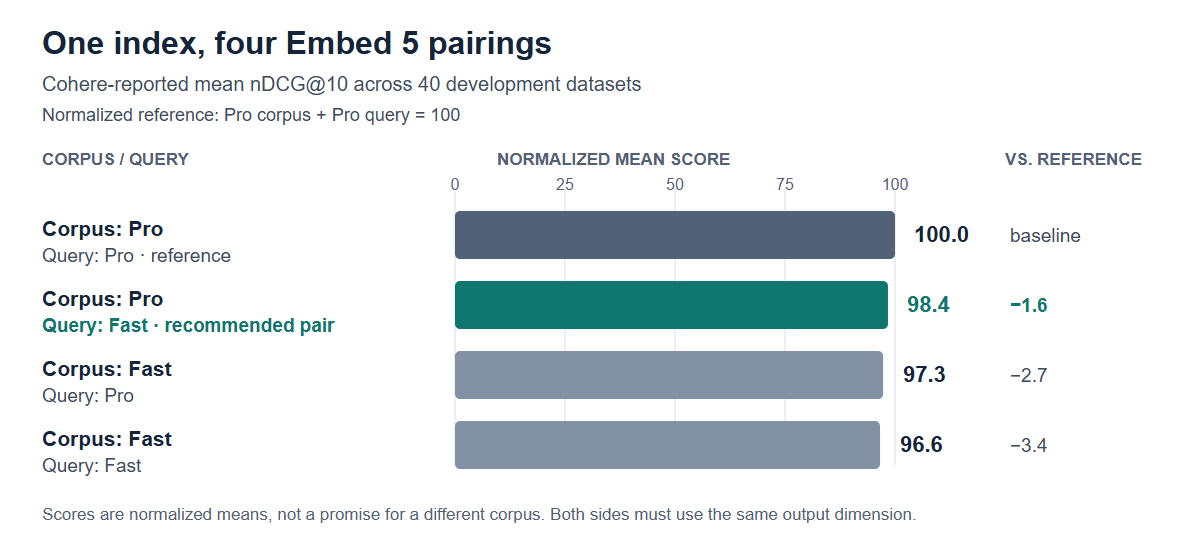
| Corpus encoder | Query encoder | Normalized mean nDCG@10 | Delta vs. Pro/Pro |
|---|---|---|---|
| Pro | Pro | 100.0 | Reference |
| Pro | Fast | 98.4 | −1.6 |
| Fast | Pro | 97.3 | −2.7 |
| Fast | Fast | 96.6 | −3.4 |
For a quality-first index with frequent live queries, Pro corpus plus Fast query is Cohere’s recommended mixed pairing. In Cohere’s aggregate, Fast corpus plus Pro query scores 97.3, which is 0.7 normalized points higher than Fast/Fast at 96.6. Pro corpus plus Fast query scores 98.4, 1.1 points higher than the reverse mix. These small aggregate differences do not establish a universal deployment winner. Cohere’s footnote requires the same output dimension on both sides and reports that the pattern persists with Matryoshka truncation and int8 quantization. See the benchmark setup and conditions.
The 40-dataset matrix is a vendor-reported mean. Cohere does not publish per-dataset scores or confidence intervals for this matrix, or the test hardware and latency settings. Treat 98.4 as a trial hypothesis, not a forecast for a different vector store, corpus, or query mix.
| Corpus model | Query model | Corpus stage: 100M tokens | Query stage: 1B tokens | Combined text cost |
|---|---|---|---|---|
| Pro | Pro | $12 | $120 | $132 |
| Pro | Fast | $12 | $80 | $92 |
| Fast | Pro | $8 | $120 | $128 |
| Fast | Fast | $8 | $80 | $88 |
Formula: (corpus tokens ÷ 1,000,000 × corpus rate) + (query tokens ÷ 1,000,000 × query rate). For example, Pro/Fast is (100 × $0.12) + (1,000 × $0.08) = $92. This scenario is hypothetical and shows text charges only. It excludes image tokens, storage, database costs, reranking, and generation, and it is not a forecast of real workload spend.
Check the API contract before changing your index
Cohere’s current model reference lists both models with a 128K-token context window, 100+ languages, and text, image, and fused text-plus-image inputs. Both list output dimensions of 256, 512, 768, 1,024, 1,536, and 2,048; the default is 2,048. See Cohere’s model table.
For retrieval, set input_type="search_document" for corpus content and input_type="search_query" for queries. Cohere’s v2 endpoint accepts up to 96 texts or mixed input objects per call. Image inputs are data URIs for JPEG, PNG, WebP, or GIF files; the reference caps combined image payload at 20 MB. Cohere’s mixed-content example sends text and image components together in one input object. The default truncation mode is END, which drops excess tokens from the end of an overlong input. Set truncate="NONE" when oversized inputs should fail rather than lose their tail. Check the v2 Embed API reference.
The Embed 5 launch and model table highlight float, int8, and binary outputs. The current API reference also lists uint8, ubinary, and base64 representations for supported Embed models. The default response is float. Choose an output type and dimension that your vector database can store, and keep corpus and query vectors compatible. If your index schema is fixed at 1,536 dimensions, set that dimension explicitly instead of relying on Embed 5’s 2,048 default. API reference and model table list the current options.
Cohere’s direct shared-space statement applies to Embed 5 Pro and Fast. It does not establish compatibility with Embed 4 vectors or embeddings from another model. Matching dimensions alone does not prove semantic compatibility. For an older-model migration, use a separate index or namespace, re-embed documents with the selected Embed 5 corpus encoder and embed new queries with a compatible Embed 5 query encoder, then evaluate before routing production traffic to the new vectors. Cohere’s compatibility statement covers the two Embed 5 variants.
| Published interface | Default output dimension | Listed output dimensions | What to verify |
|---|---|---|---|
| Cohere Embed 5 model table | 2,048 for Pro and Fast | 256, 512, 768, 1,024, 1,536, 2,048 | Use explicit model, dimension, and output type. |
| AWS SageMaker Pro parameters | 1,536 | 256, 512, 1,024, 1,536 | Pro listing appears out of sync with Cohere’s Embed 5 table. |
| AWS SageMaker Fast parameters | 1,024 | 256, 512, 768, 1,024, 1,536, 2,048 | Fast listing has a different stated default. |
The AWS Pro parameter table appears out of sync with Cohere’s Embed 5 model table, and AWS lists a different default for Fast. That is an inference from the published-source conflict, not a confirmed endpoint defect. Before moving an index to SageMaker, confirm the selected offer and endpoint’s current model version, allowed parameters, and defaults. Do not assume Cohere API SDK calls or defaults work unchanged on SageMaker or Microsoft Foundry. AWS Pro listing, AWS Fast listing, and Cohere’s current model table.
The Embed endpoint’s documented inputs are text strings, image data URIs, and mixed content; the current reference does not list a PDF-file field. If you need to turn PDFs into structured text or page content first, see our Cohere Parse guide to PDF ingestion and structured outputs. Keep parsing and embedding as separate steps in your estimate.
Compare the billing unit for your deployment
Cohere API, Model Vault, Microsoft Foundry, and Amazon SageMaker expose different cost units. Do not carry the Cohere API token rate over to an instance-based deployment.
| Deployment route | Embed 5 Pro | Embed 5 Fast | Unit and caveat |
|---|---|---|---|
| Cohere API | $0.12 per 1M text tokens; $0.40 per 1M image tokens | $0.08 per 1M text tokens; $0.40 per 1M image tokens | Token-based. The accessed Cohere API pricing and API references do not provide a conversion from image files or page count to billed image tokens. |
| Cohere Model Vault, Small | $3/hour or $2,000/month | $3/hour or $2,000/month | Per instance. |
| Cohere Model Vault, Medium | $5/hour or $3,250/month | $5/hour or $3,250/month | Per instance. |
| Amazon SageMaker, ml.g5.xlarge real-time example | $2.39 per host-hour | $2.39 per host-hour | Marketplace software charge; AWS infrastructure costs may apply. Other instance types and modes have different rates. |
| Microsoft Foundry | Pay-as-you-go token billing | Pay-as-you-go token billing | Cohere Azure guidance confirms the billing basis but does not state a current rate; check the Foundry offer before budgeting. |
Cohere lists Embed 5 on its API, Model Vault, Microsoft Foundry, and Amazon SageMaker. It also documents vLLM for private deployments in a customer’s own VPC or on premises; private-deployment pricing is custom. Cohere’s launch announcement lists these availability and private-deployment routes. Cohere’s pricing page distinguishes per-instance Model Vault rates from token billing. The SageMaker listing price is a software usage charge, with AWS infrastructure billed separately. Azure guidance confirms token billing but does not provide the Foundry rate in the accessed documentation. See Cohere’s Azure guidance.
For image-heavy workloads, do not multiply the number of page images by $0.40. Cohere quotes that rate per million image tokens, but the sources checked here do not publish a token conversion for a page or file. Check usage reporting or price a small approved sample before estimating a large image corpus.
Run a small evaluation on your corpus
- Choose representative documents and real query types, including cases that matter to your team: tables, scanned pages, multilingual terms, and short interactive searches.
- Hold parsing, chunking, filters, vector-store settings, output dimension, and precision constant. Compare Pro/Pro, Pro/Fast, Fast/Pro, and Fast/Fast so the encoder pairing is the change.
- Measure relevance with labels from your own search tasks. Track query latency separately from indexing throughput, token charges, image-token usage, and vector storage. Decide in advance what quality or latency change you will accept.
Cohere’s launch also reports ViDoRe V3 results with RCP-nDCG@10, a separate measure from the 40-dataset nDCG@10 matrix. Cohere describes RCP-nDCG@10 as evaluating the ordering of a fixed candidate set, so those results do not by themselves show first-stage retrieval from a full corpus. Read Cohere’s explanation of RCP-nDCG@10 and keep candidate generation in mind when comparing its scores.
Cohere API example: Pro documents and Fast queries
Prerequisites: install the official SDK and NumPy with pip install cohere numpy, then set CO_API_KEY in the process environment. This Cohere v2 example uses Pro for search_document, Fast for search_query, and the same 1,024-dimensional float output on both sides. It ranks an illustrative three-document corpus by cosine similarity. The method follows Cohere’s launch example and v2 API reference. Cohere launch sample; v2 Embed API.
import os
import cohere
import numpy as np

client = cohere.ClientV2(api_key=os.environ["CO_API_KEY"])

documents = [
    "Annual report: operating expenses rose 8 percent.",
    "Maintenance guide: inspect the compressor every 90 days.",
    "Leave policy: employees accrue 1.5 paid days per month.",
]

doc_embeddings = client.embed(
    model="embed-v5.0-pro",
    input_type="search_document",
    texts=documents,
    output_dimension=1024,
    embedding_types=["float"],
    truncate="NONE",
).embeddings.float_

query = "How often should the compressor be inspected?"
query_embedding = client.embed(
    model="embed-v5.0-fast",
    input_type="search_query",
    texts=[query],
    output_dimension=1024,
    embedding_types=["float"],
    truncate="NONE",
).embeddings.float_[0]

doc_vectors = np.asarray(doc_embeddings)
query_vector = np.asarray(query_embedding)
cosine_scores = doc_vectors @ query_vector / (
    np.linalg.norm(doc_vectors, axis=1) * np.linalg.norm(query_vector)
)
for index in np.argsort(cosine_scores)[::-1][:2]:
    print(f"{cosine_scores[index]:.3f} {documents[index]}")
Execution status: This API example was not executed by DMT. The document set is illustrative; no observed match, returned score, throughput, or latency is claimed.
AI assistance disclosure: AI tools assisted with source review and drafting. DMT did not run the Cohere API example or independently reproduce Cohere’s benchmark. All benchmark scores above are labeled as Cohere-reported.