


July 29 update: Google’s new social and video analysis workflow
Google’s launch documentation explained what platform properties are. The 29 July guide explains what to do with them. The new guidance focuses on five decisions: identify queries driving discovery, catch content that is starting to trend, compare formats, compare platforms and measure the effect of title or caption changes.
The feature remains a Google-discovery report. It does not replace native platform analytics, social listening or website conversion measurement. Search Console can show that a TikTok, Instagram post, X post or YouTube video earned impressions and clicks on Google; it cannot tell you the full in-platform watch, engagement or revenue story.
1. Use query groups to find themes, not isolated keywords
The Search Console Insights report groups related queries and shows which themes are top-performing, trending up or trending down. This is more useful than reacting to a single low-volume phrase. A cluster of rising queries can reveal the language people use, the subtopic they care about and the next content format worth producing.
For example, if a YouTube tutorial attracts several rising queries about setup errors, the opportunity may be a troubleshooting follow-up—not simply inserting every phrase into the old title. Apply the same search-intent diagnosis used for web pages: ask what the searcher needs to accomplish and whether the current asset actually resolves it.
2. Use the 24-hour filter for emerging demand
Google recommends the 24-hour Performance report when a new post or video may be taking off. The filter can surface the search terms driving early discovery and support time-sensitive cross-promotion. This is especially useful for launches, news, trends and seasonal content where a 28-day view is too slow.
- Select the verified platform property.
- Open Performance and choose the 24-hour filter.
- Inspect pages or content URLs first, then queries.
- Confirm the rise is meaningful relative to the property’s normal baseline.
- Cross-promote or create a follow-up only when the query reveals a real unmet need.
- Record the action date so the later comparison has context.
Do not call every spike a trend. A property with small volume can produce dramatic percentage changes from a handful of impressions. Use absolute clicks and impressions, country, device and the content’s normal range.
3. Compare short-form and long-form content correctly
Google’s guide shows how URL patterns can separate formats. On YouTube, compare URLs containing /watch against /shorts/. On Instagram, compare /p/ posts with /reels/. This reveals how each format performs in Google Search, not which format is universally better.
| Comparison | Question it can answer | What it cannot prove |
|---|---|---|
| YouTube watch vs Shorts | Which format earns more Google impressions, clicks or stronger CTR for this channel? | Total YouTube reach, watch time or subscriber impact |
| Instagram posts vs Reels | Which URL type attracts more Google discovery? | Which format performs better inside Instagram |
| Platform A vs Platform B | How Google search demand and audience geography differ | A clean cross-platform ROI comparison without native and conversion data |
| Before vs after title change | Whether Google-side discovery changed after a documented edit | Causation without accounting for seasonality, ranking volatility or other changes |
4. Compare platforms as different search assets
A topic can behave differently by platform because the content format, audience, page template and Google’s result presentation differ. A long YouTube tutorial may attract durable how-to queries, while a TikTok version receives a short burst around a trend. The correct action may be to repackage the stronger explanation, not copy the same caption everywhere.
Create a simple weekly table with platform, content URL, content type, top query group, clicks, impressions, CTR, position, country and action. Keep website Search Console data separate so platform traffic does not get confused with owned-site traffic. DMT’s generative AI reporting guide uses the same principle: separate report scopes before combining insights.
5. Measure title and caption changes with annotations
Google recommends adding an annotation in Search Console when a YouTube title or TikTok caption changes. The annotation creates a visible date marker for later comparison. It is an audit aid, not an experiment by itself.
For a cleaner evaluation:
- Change one meaningful element at a time.
- Record the old and new wording outside Search Console.
- Compare equivalent pre/post periods when possible.
- Check query mix, not only total clicks.
- Account for news cycles, seasonality and unrelated distribution.
- Do not repeatedly edit a title before enough data accumulates.
A weekly social-search scorecard
| Field | Purpose |
|---|---|
| Platform property | Keeps account and channel scope explicit |
| Content URL and format | Separates video, Short, Reel, post, Story or playlist page |
| Clicks, impressions, CTR, position | Measures Google-side discovery |
| Top and rising query groups | Reveals audience language and emerging intent |
| Country and device | Finds audience and presentation differences |
| Native views, retention and engagement | Adds in-platform performance outside Search Console |
| Website sessions or conversions | Adds owned-site business outcome where trackable |
| Action and annotation date | Creates an audit trail for later evaluation |
Use the scorecard to decide among four actions: leave the asset alone, improve its title/caption, create a format-specific follow-up, or connect it to a stronger owned-page journey. Avoid converting every promising query into another near-duplicate asset. A sound SEO content strategy still needs canonical ownership and a clear job for each URL.
What this means for social SEO in 2026
“Social SEO” is becoming measurable on the Google side, but it is not a new ranking system or a shortcut around helpful content. Platform properties give creators first-party visibility into how supported third-party content appears and earns clicks across Google. The operating advantage comes from faster feedback: spot the exact language people use, identify which formats earn search discovery and repurpose evidence-backed winners.
Teams building social content with AI should keep the same quality boundary. A tool can generate many variations, but volume without differentiation creates more review work and more weak assets. DMT’s AI tools for social media marketing guide explains how to use automation without surrendering brand judgment.
Official source: Google Search Central, “Analyze your social and video platform content performance in Search Console”, last updated 29 July 2026. The guide’s images and text are available under the Google Developers site’s stated CC BY 4.0 terms; any Google screenshot already reproduced in this article is captioned and credited to that official source.
Google Search Console is no longer only for websites. On July 7, 2026, Google launched platform properties, a new property type that lets creators, publishers, brands, and agencies measure how content from Instagram, TikTok, X, and YouTube performs when people discover it through Google.
The change matters because it exposes a part of organic search that has historically been difficult to measure. A TikTok video, Instagram Story, X post, or YouTube video may appear in Google Search or Discover, but the account owner has had limited first-party visibility into the Google queries and search interactions behind that discovery. Platform properties begin to close that gap.
This is not a replacement for native social analytics, and it does not turn Search Console into an all-channel attribution platform. It is a focused reporting layer for a specific question: how is content published on supported third-party platforms being discovered across Google?
Platform properties at a glance
- Supported at launch: Instagram, TikTok, X, and YouTube.
- What it measures: Google-side impressions, clicks, CTR, position, queries, content performance, and eligible Discover or Google News traffic.
- What it does not measure: views, reach, engagement, watch time, or conversions occurring inside the social platform itself.
- Availability: Google is rolling the feature out gradually, so it may not yet appear in every Search Console account.
- Setup: add each account or channel as a separate property and verify ownership.
What are platform properties in Google Search Console?
A Search Console property is an asset that you can inspect and manage in the product. Until now, most users thought about properties in website terms: a domain property covering a whole domain, or a URL-prefix property covering a specific protocol and path.
A platform property represents a verified account or channel on a supported social or video platform. Instead of reporting only on URLs that belong to your website, Search Console can report on eligible content attached to that verified Instagram, TikTok, X, or YouTube presence when it appears across Google.
Google says each account or channel should be added as its own property. If a company has two YouTube channels and three Instagram accounts, those are separate properties rather than a single combined social property.
| Property type | What it represents | Typical verification | Primary use |
|---|---|---|---|
| Domain property | An entire domain across protocols and subdomains | DNS record | Complete website search performance and health |
| URL-prefix property | URLs beginning with an exact protocol and prefix | Multiple supported methods | Monitoring a particular site, protocol, subdomain, or section |
| Platform property | A supported social account or video channel | Existing website connection or direct platform login | Google discovery and traffic for third-party platform content |
The official Search Console property documentation also makes an important distinction: adding a property does not change how the asset ranks or appears on Google. It enables reporting; it is not a ranking intervention.
What changed from Google’s earlier social-channel experiment?
Platform properties did not appear from nowhere. In December 2025, Google announced a limited Search Console Insights experiment that displayed performance for social channels associated with a website. Search Console identified eligible site-channel relationships automatically, and only a limited set of sites could participate.
The July 2026 release is materially broader:
| December 2025 experiment | July 2026 platform properties |
|---|---|
| Social data appeared inside the Insights experience for an associated website. | The social account or channel becomes a standalone Search Console property. |
| Search Console automatically identified eligible channels. | Owners can select a supported platform and verify the connection. |
| Available to a limited set of websites and detected channels. | Rolling out gradually to creators, publishers, and site owners. |
| Centred on a combined website-and-social Insights view. | Includes Performance, Insights, and Achievements for the platform property. |
| A website relationship was central to the experiment. | Google explicitly describes the feature as useful even for creators without their own website. |
This evolution is strategically important. Google is treating third-party profiles as measurable search assets in their own right, not merely as extensions attached to a website dashboard. For marketers already adapting their digital marketing strategy for 2026, owned websites and platform accounts should now be analysed as different nodes in the same search-discovery system.
Which platforms are supported?
At launch, Google lists four supported platforms:
- TikTok
- X
- YouTube
Google has not announced support for Facebook, LinkedIn, Pinterest, Reddit, Threads, Snapchat, or other networks in its launch documentation. Do not assume they are silently included. The supported list can change, so this is one of the facts that should be checked whenever the article or an internal operating procedure is refreshed.
The initial selection also reveals Google’s practical focus: public content formats that frequently surface in search and can carry a distinct post, video, story, account, or channel identity. It creates a stronger measurement loop for teams investing in short-form video, creator-led media, and YouTube search visibility. If video is central to your acquisition plan, it is worth connecting this data with a broader understanding of video marketing workflows and tools rather than treating Search Console as a production platform.
What data can you see?
Platform properties focus on performance and traffic insights. Google documents three main report surfaces.
1. Performance report
The Performance report includes familiar Search Console metrics:
- Clicks: qualifying clicks from a Google surface to, or into, the platform content.
- Impressions: qualifying appearances of the platform content on Google.
- Average CTR: clicks divided by impressions.
- Average position: the average search position under Search Console’s reporting rules.
You can use filters and dimensions to investigate which posts and search queries drive performance. Google’s launch announcement also says the data can be exported for analysis in another tool.
Platform properties may report performance across Google Search, Discover, and Google News. Discover and News reports appear only when the property receives eligible traffic from those surfaces. Their absence is therefore not necessarily a setup error.
2. Insights report
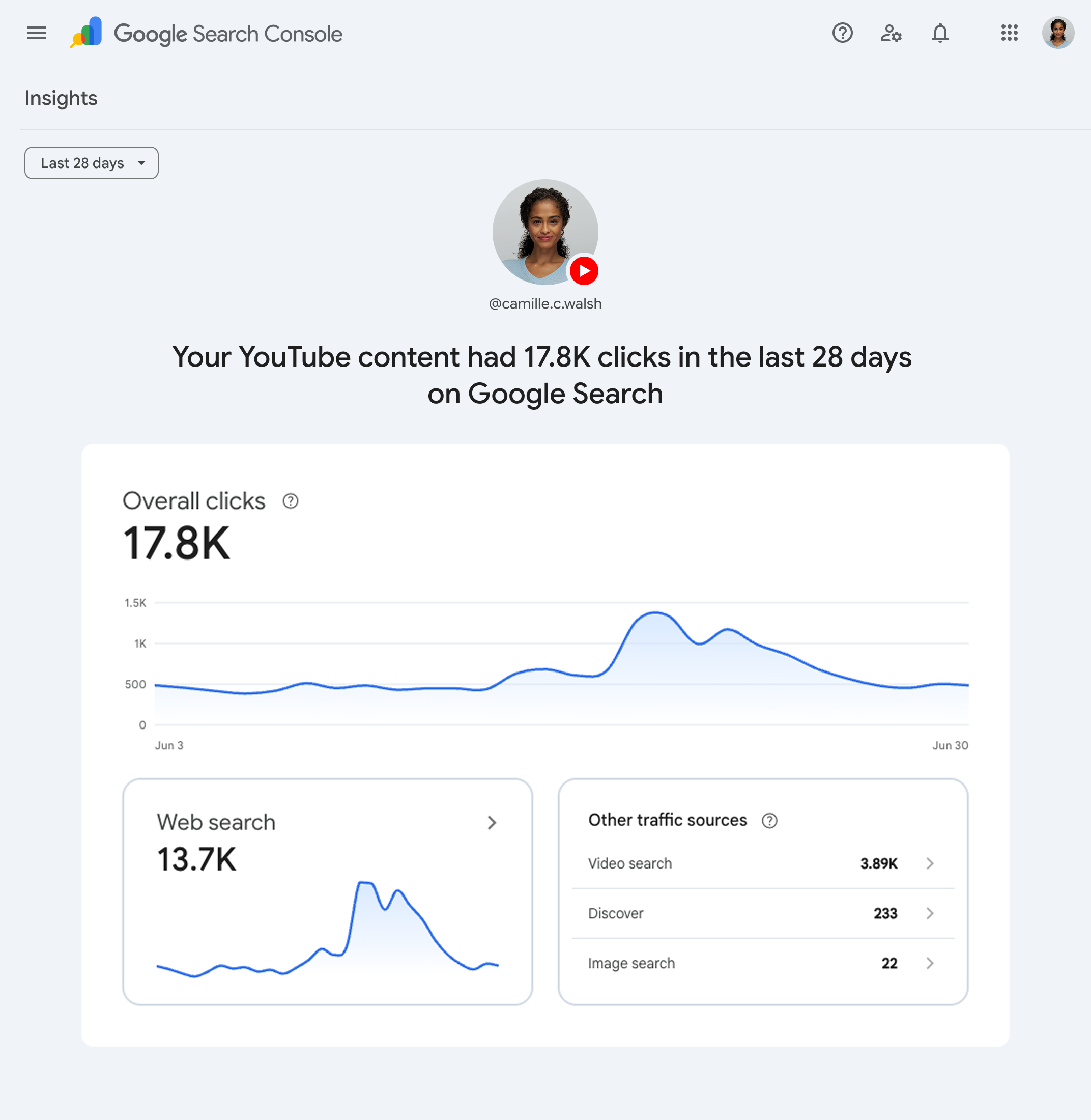
Insights provides a more accessible summary of recent traffic trends, top-performing content, and the ways people discover the account on Google. It is designed for fast interpretation rather than the full diagnostic flexibility of Performance.
There is a reporting nuance worth documenting. Google says the main summary card in Insights can include clicks across web, image, video, and news searches. The detailed lists below it concentrate on web search. As a result, the card totals may be higher than the sum of the detailed items. That difference is a scope difference, not automatically a data-quality failure.
3. Achievements
Achievements tracks click-based milestones, such as reaching a new threshold of Search clicks over the last 28 days. It is useful as a simple progress signal, although mature teams should avoid using milestones as a substitute for content-level diagnosis.
How does Google count platform content?
Metric definitions matter because a “view” means different things in different systems. Google provides two useful examples:
- If an Instagram Story appears in Google Search, that eligible appearance can count as an impression. A qualifying click from the result counts as a click.
- If a video appears in Search or Discover, it can receive an impression. A user action can count as a click even when the video opens inside Google’s own viewer rather than immediately sending the user to the platform’s normal page.
This is why Search Console clicks should not be expected to reconcile perfectly with referral sessions in a website analytics package or with outbound referral counts inside a social analytics dashboard. Each product has its own scope, processing rules, attribution boundaries, and privacy protections.
Important measurement boundary: Do not label platform-property impressions as social reach. They are Google-side impressions for eligible content. Likewise, do not label clicks as native video views, post engagement, leads, or revenue unless another verified measurement step connects them.
What platform properties do not tell you
The most useful way to understand a new report is to define its boundary. Platform properties do not provide:
- Total impressions or reach inside Instagram, TikTok, X, or YouTube.
- Native engagement metrics such as likes, comments, shares, saves, follower growth, or watch time.
- A combined dashboard that automatically merges every platform into one property.
- Proof that adding a property improves rankings.
- Complete multi-touch attribution from search impression to sale.
- A guaranteed explanation for why a post gained or lost visibility.
- Historical data from before the property began collecting data.
The limitation is healthy. Search Console is best used as evidence about Google discovery. Native platform analytics explains in-platform consumption and engagement. Website analytics and CRM data explain downstream behaviour. A reliable measurement model keeps those layers separate before combining them.
How to add a platform property, step by step
- Open Google Search Console.
- Open the property selector in the sidebar and choose Add property. Google also provides a direct verification page.
- Find the platform-property section and select Instagram, TikTok, X, or YouTube.
- Follow the on-screen ownership and authorization prompts. Depending on the asset, Google documents an automated connection through an existing website property or a direct platform login.
- After verification succeeds, select Go to property.
- Repeat the process for every additional account or channel you manage.
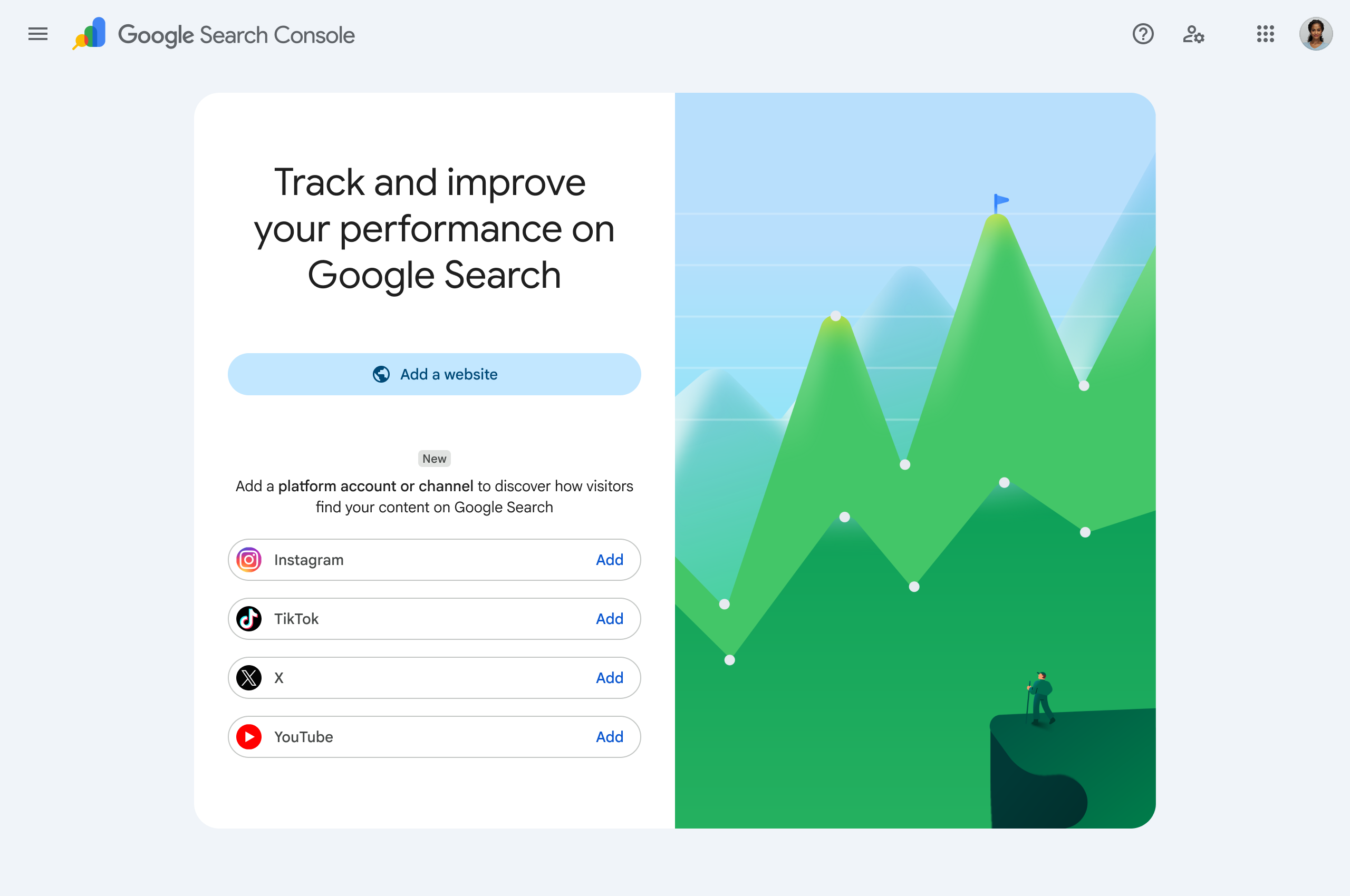
If you do not see the platform options, there may be nothing to fix. Google says the feature is becoming available gradually over the weeks following launch.
After setup, allow a few days for data to appear. New properties may initially show empty charts, and a recently created property will only display data collected since its creation. Search Console does not promise to backfill older platform performance.
Keep the connection active
Google periodically checks ownership for security. If the external login expires or the connection is lost, access to the platform property pauses until ownership is verified again. After re-verification, Google says you regain access to the same report without waiting for the dataset to accumulate from zero.
For agencies, this makes ownership hygiene an operational requirement. Record the account owner, the verification method, the date last checked, and who is responsible for re-verification. Otherwise a quarterly report can fail because the connection quietly expired weeks earlier.
How to turn platform-property data into better content decisions
The most valuable part of the new property type is the connection between a search query and a specific social or video post. It lets a team see whether Google is surfacing the content for the audience and intent it was designed to serve.
Use the query and post data to answer four practical questions:
- Is Google matching the content to the intended topic? Unexpected queries may reveal an unclear title, description, hook, or content focus.
- Which posts earn visibility but few clicks? Review the title, thumbnail, opening frame, snippet context, and the competing results before changing the content.
- Which questions deserve a follow-up? A repeated, substantial query may justify a new video, post, chapter, or detailed companion article.
- Which high-performing ideas should be expanded? A strong post can become a deeper owned-site resource, a series, or a format adapted for another supported platform.
Do not create a new post for every query. First decide whether the best response is a description update, a clearer chapter, a follow-up, a consolidated guide, or no action. That is the same discipline behind a strong SEO content strategy: use observed demand to improve usefulness rather than simply increasing output.
When performance changes, check the content itself and the current official platform documentation before drawing conclusions. Interface changes, revised product names, seasonality, competition, demand shifts, and changes in Google’s result presentation can all affect the chart. A maintained Google updates log can provide context, but it should not become the default explanation for every movement.
A 30-day operating workflow for marketers and creators
Days 1–3: establish the baseline
- Add every eligible account as a separate platform property.
- Record the verification owner and connection date.
- Confirm which reports are available and note that Discover or News may be absent without eligible traffic.
- Save a baseline export after data begins appearing.
Days 4–14: map discovery
- Identify posts with meaningful Google impressions.
- Group queries by intent: informational, navigational, comparison, troubleshooting, or action-oriented.
- Compare high-impression/low-CTR items with high-CTR items.
- Separate branded discovery from non-branded topical discovery where the query data allows it.
Days 15–21: inspect the strongest opportunities
- Open the content itself; never diagnose from the chart alone.
- Check whether the post directly satisfies the queries producing impressions.
- Verify dates, interface steps, claims, links, screenshots, and examples against current official sources.
- Flag weak sourcing, unclear authorship, unsupported advice, or an ambiguous next step.
- Choose whether the best response is an update, follow-up, companion page, consolidation, or no change.
Days 22–30: act and measure
- Prioritise fixes by user impact and confidence, not impressions alone.
- Refresh or extend existing content before publishing a near-duplicate.
- Create an owned-site companion resource when the answer needs more depth or durability than the platform allows.
- Record the change date so later comparisons do not confuse pre-change and post-change performance.
- Review again after enough data accumulates; avoid declaring a winner from a few days of noise.
Teams using AI to accelerate social production should apply the same discipline. Tools can increase output, but they can also multiply unsupported claims and shallow answers. A practical guide to AI tools for social media marketing is most useful when paired with human review and current source verification.
How platform properties change SEO reporting
Platform properties expand the unit of SEO analysis from “pages on our domain” to “verified content assets that Google can surface.” That does not make every social-media task SEO, but it does make search discovery measurable across more of the content portfolio.
A sensible executive dashboard should keep four layers distinct:
- Google visibility: platform-property impressions, clicks, CTR, position, queries, and eligible surface data.
- Platform consumption: native views, reach, watch time, engagement, and audience growth.
- Owned-site behaviour: sessions, engaged visits, newsletter sign-ups, enquiries, and other verified events.
- Business outcomes: qualified leads, pipeline, sales, retention, or another agreed goal.
Do not collapse these into one “organic reach” number. Report the handoffs. A platform item may earn search visibility without producing a website session. A video may play inside a Google viewer. A person may discover a brand through a social result and convert later through a branded search. The new data improves visibility into the journey; it does not eliminate attribution uncertainty.
This broader search surface also intersects with AI-driven discovery. Marketers monitoring Google AI Mode and AI Overviews should resist the temptation to merge unrelated metrics. Platform properties have their own documented reporting scope. Analyse each report according to Google’s current definitions.
Common mistakes to avoid
Calling it social-media analytics inside Search Console
That description is too broad. It is Google-discovery reporting for supported platform properties.
Expecting retroactive history
New properties can show partial charts because data begins accumulating around property creation. Establish properties early if the accounts matter.
Adding one account and assuming the others are included
Each supported account or channel is a separate property.
Comparing Search Console clicks directly with native views
The metrics describe different events under different counting rules.
Ignoring verification expiry
Periodic ownership checks can pause access. Assign an owner for reconnection.
Publishing a new post for every query
Queries are evidence, not an automatic content brief. First decide whether the need belongs in an update, a follow-up, a consolidated guide, or no new content at all.
Treating a falling chart as proof of stale content
Outdated content is only one possible explanation. Verify the facts, the search results, demand, competition, and reporting scope before acting.
Frequently asked questions
Do I need a website to use a platform property?
Google’s launch announcement says platform properties are intended to help creators even when they do not have their own website. Ownership of the platform account or channel must still be verified through the available flow.
Does adding an Instagram or YouTube property improve rankings?
No. Google states that adding a property enables monitoring and does not itself affect how the website or platform property appears in Search.
Can I track Facebook or LinkedIn?
Not according to Google’s launch list. The documented platforms are Instagram, TikTok, X, and YouTube.
Why is the property option missing from my account?
Google is rolling the feature out gradually. If the setup option is absent, the rollout may not have reached that account yet.
Why is there no data after verification?
Google says processing can take a few days. New properties also show only the period since data collection started, and content must receive eligible Google visibility before metrics can appear.
Why do the Insights totals not match the detailed cards?
The main Insights summary may include clicks across multiple Google search types, while detailed lists focus on web results. The scopes can therefore differ.
Does the report include activity inside TikTok or Instagram?
No. It reports how eligible platform content performs on Google. Native platform impressions, engagement, watch time, and similar metrics remain in the platform’s own analytics.
My take: this is a measurement upgrade, not a channel merger
Platform properties are one of the more strategically interesting Search Console changes because they recognise how fragmented modern discovery has become. A useful answer can live on a website, a YouTube channel, an Instagram account, a TikTok profile, or an X thread—and Google may surface any of them.
The immediate win is better reporting. The larger win is a tighter content-improvement loop: queries reveal what audiences are actually looking for, changing performance prompts investigation, and post-level data helps teams decide what deserves an update, expansion, companion page, or retirement.
Use the feature with disciplined boundaries. Search Console explains Google discovery. Native analytics explains platform consumption. Owned analytics and CRM systems explain downstream outcomes. When those layers are kept honest, platform properties add evidence without creating a new attribution myth.
Official sources and update note: This guide was researched and last checked on July 10, 2026 against Google’s launch announcement, platform-property help documentation, property setup documentation, and the December 2025 experiment announcement. Product availability and reporting details may change during rollout.


You’re an extremely helpful website; could not make it without ya!
I benefit from browsing your web sites. thnx!